
Passkeys in the Billfold Dashboard
A faster, safer and convenient way to sign in

Passkeys are a more reliable and convenient way to access the Billfold Dashboard, allowing you to sign in without a password and get instant access to your data. The technology uses Face ID and Touch ID, Windows Hello, hardware security keys and built-in browser passkey managers. This provides fast and secure authentication without the risk of phishing or credential leaks.
Why it matters for venues and teams working live events
Passkeys solve the challenge of quickly interacting with the Dashboard during active events. Sign-in becomes instant, one touch or confirmation and you immediately see your live data. This speeds up workflows, reduces sign-in errors and improves overall security.
There is no need to waste time resetting forgotten passwords or coming up with complex combinations. With passkeys, access to the Dashboard remains stable and predictable exactly when speed and accuracy matter most.
How to set it up
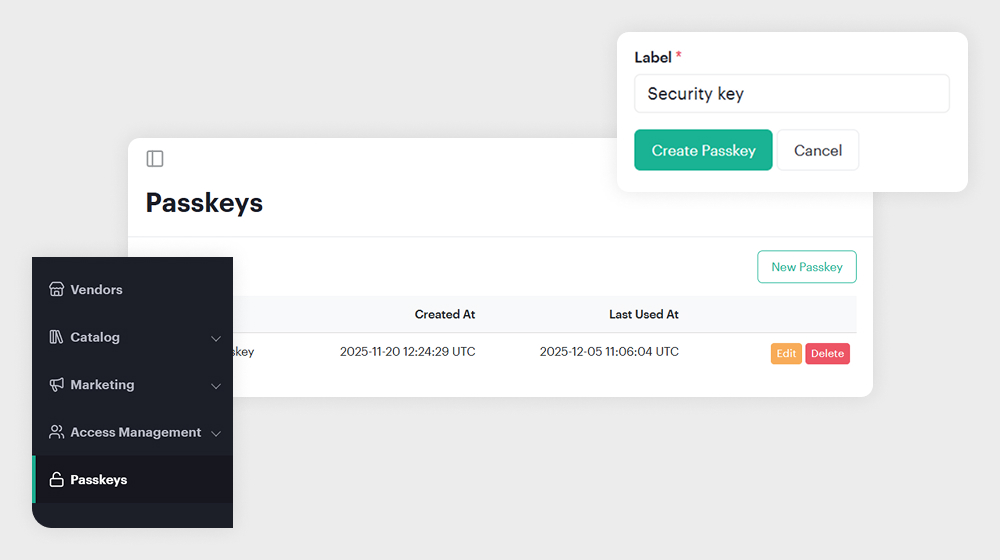
Getting started takes less than a minute:
- Open Passkeys in the Dashboard sidebar
- Click New Passkey
- Add a label to identify it
- Click Create Passkey
- Choose the authentication method your device offers
- Follow the on-screen steps to complete setup
Once saved, you can sign in instantly using your passkey with no typing, no recovery codes, no friction.
